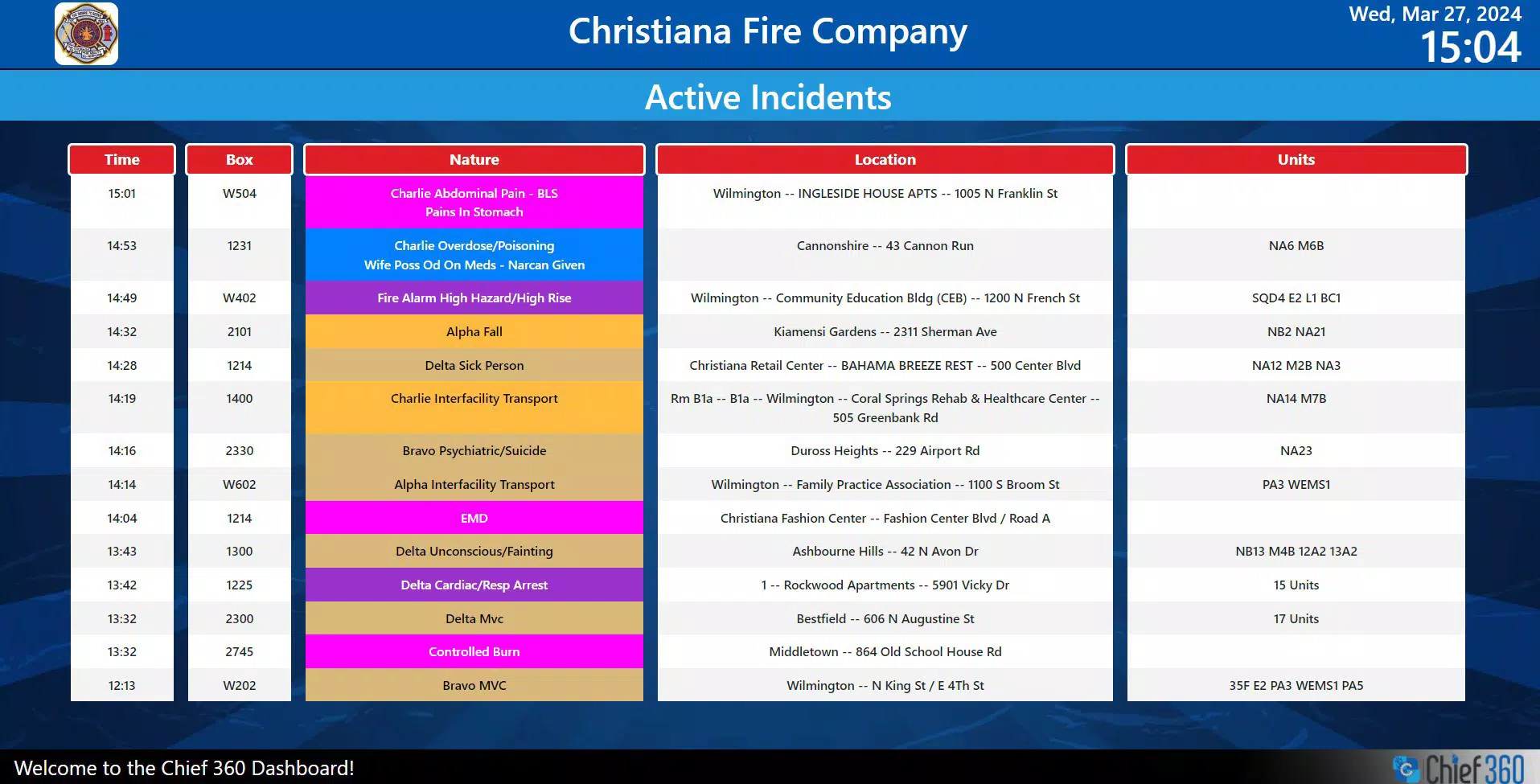

Download Chief 360 Dashboard – emergency response, fire department, EMS, police, command center, real-time data
Overview
Chief 360 Dashboard is a specialized productivity tool designed for emergency services agencies, including fire departments, EMS units, and police departments. Its primary purpose is to deliver real-time and non-emergency information to large display systems within command centers and public safety facilities. By centralizing critical incident data and operational content, the application supports rapid decision-making during high-pressure scenarios. The app is tailored to meet the unique needs of first responders who rely on timely, accurate, and visible information to coordinate responses and ensure public safety.
Designed for use in command and control environments, Chief 360 Dashboard enables agencies to maintain situational awareness through dynamic data presentation. The application supports both emergency content access and administrative information, making it a dual-purpose solution for operational readiness and daily management tasks. Its focus on large display compatibility ensures that multiple personnel can view key updates simultaneously, enhancing team coordination during incidents.
The developer, Chief 360, has positioned the app as a utility for emergency management professionals. While specific details about the company’s background were not provided, the app’s targeted functionality suggests a strong understanding of public safety workflows. Real-world use cases include monitoring active incidents, displaying emergency protocols, and managing resource deployment in real time. In the broader app ecosystem, Chief 360 Dashboard fills a niche for mission-critical software that operates outside consumer mobile platforms, emphasizing reliability and operational integration over consumer-facing features.
Key Features & Functionality
- Emergency Content Access: The app delivers immediate access to critical incident data, enabling first responders to stay informed during emergencies. This feature supports real-time decision-making, which is essential in high-stakes environments where delays can impact outcomes. For example, during a multi-vehicle accident, the dashboard can display location, severity, and available resources, allowing command staff to allocate units efficiently.
- Non-Emergency Information Display: In addition to emergency alerts, the dashboard presents non-emergency content such as shift schedules, training updates, and administrative notices. This functionality supports daily operations and helps maintain organizational readiness. For instance, a fire department can use the dashboard to display upcoming drills or equipment maintenance logs on a public board.
- User-Friendly Interface: The interface is designed for intuitive navigation, minimizing the learning curve for users under pressure. Even during urgent situations, personnel can quickly locate necessary information without extensive training. This ease of use is particularly valuable in environments where time is a critical factor.
- Large Display Compatibility: Optimized for large screens, the application ensures high visibility across command centers and public information displays. Multiple team members can view data simultaneously, improving communication and coordination. This feature is essential in scenarios requiring joint operations between agencies.
- Windows Support with .NET Runtime Requirement: The app operates exclusively on Windows systems and requires the .NET Desktop runtime to function. Users must install this prerequisite before running the application to ensure full functionality. While this adds an initial setup step, it supports stable performance and compatibility with existing infrastructure.
Interface, UX & Performance
The user interface of Chief 360 Dashboard is structured for clarity and efficiency, prioritizing readability and accessibility in high-stress environments. The layout emphasizes large text, clear icons, and high-contrast visuals to ensure information is instantly legible from a distance. Navigation is streamlined, with minimal menu layers, allowing users to access key functions with few interactions.
Although the developer did not list formal performance metrics, the app’s design suggests optimized responsiveness for continuous operation in command centers. The interface remains stable during extended use, which is crucial for maintaining situational awareness during prolonged incidents. Users can expect consistent updates and minimal lag when displaying real-time data.
Performance on different device categories was not specified, but the application’s focus on large displays indicates it is intended for fixed installations such as wall-mounted screens or control room monitors. The app does not appear to be designed for mobile or handheld use. Responsiveness is likely optimized for desktop-class hardware, ensuring smooth rendering of dynamic content. Stability is maintained through its reliance on the .NET Desktop runtime, which provides a robust execution environment for Windows-based applications.
Platform Compatibility & Technical Requirements
Chief 360 Dashboard is available exclusively for Windows platforms. The application requires the .NET Desktop runtime to be installed prior to use, a prerequisite that ensures compatibility with the app’s underlying framework. Users must verify that this runtime is present on their system before attempting installation.
The app has a file size of 45.6 MB, which is relatively compact for a specialized utility. This size suggests efficient resource usage and quick deployment on supported systems. The software version is 1.0.0, indicating a stable initial release. Specific OS version requirements were not listed, so users should ensure their Windows environment supports the .NET Desktop runtime to avoid installation issues.
The developer did not specify minimum OS requirements or compatibility with older Windows versions. Users are advised to consult official documentation or support channels for guidance on system compatibility. While the app is not available on mobile platforms, its design aligns with desktop-based command center operations.
Pros and Cons
- Designed specifically for emergency services with real-time data delivery
- Supports both emergency and non-emergency content for comprehensive use
- Optimized for large display screens for team visibility
- Intuitive interface reduces training time and operational delays
- Stable performance through reliance on .NET Desktop runtime
- Requires .NET Desktop runtime installation, adding setup complexity
- Exclusive to Windows; not available on mobile or other platforms
- Specific OS requirements were not disclosed
- Not designed for handheld or mobile use
- Limited public-facing features; primarily for internal agency use
FAQ
Is Chief 360 Dashboard available for Android or iOS?
No, the app is only available for Windows systems. It is not compatible with mobile platforms such as Android or iOS.
Do I need to install anything before using Chief 360 Dashboard?
Yes, the .NET Desktop runtime must be installed on your Windows machine before using the application. This prerequisite is required for the app to function properly.
Can I use Chief 360 Dashboard on older versions of Windows?
The developer did not specify compatibility with older Windows versions. Users should ensure their system supports the .NET Desktop runtime and consult official documentation for further guidance.
Is Chief 360 Dashboard free to download and use?
Yes, the app is available at no cost. The current price is $0.00, making it accessible for public safety agencies with limited software budgets.
How often does the app update with new data?
Update frequency depends on the data source and agency configuration. The app is designed to support real-time updates, but the timing is determined by the system integrations in place.
Final Thoughts
Chief 360 Dashboard stands out as a focused, high-utility tool for emergency services agencies seeking reliable, real-time information delivery. Its dual capability to manage emergency alerts and administrative content makes it a versatile asset in command centers and public safety operations. The app’s emphasis on large display compatibility and intuitive design ensures that critical information remains visible and accessible to multiple personnel simultaneously.
While its exclusive Windows support and .NET runtime requirement limit flexibility, these constraints are typical for specialized command and control software. For fire departments, EMS teams, and police agencies operating in fixed command environments, the app offers a streamlined solution for situational awareness and coordination.
With a lightweight 45.6 MB footprint and a free price model, Chief 360 Dashboard provides strong value for organizations prioritizing operational efficiency and public safety. Its targeted design reflects a deep understanding of emergency response workflows.
Download Chief 360 Dashboard now


